Advanced Settings
Clear all syncing information and mapping data from Shopify. This action removes sync status for customers, orders, and products.
Clear Synco Data
Clear Synco Data removes all syncing information saved in Shopify that is required for app functionality. This action permanently deletes mapping data that shows which Shopify items are synced to Odoo.

What Gets Deleted
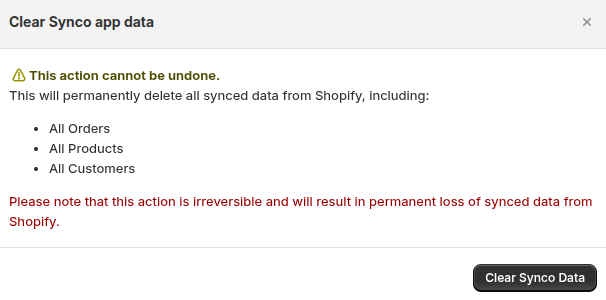
This action will permanently delete all synced data from Shopify, including:
- All Orders: Order sync status and Odoo mapping information
- All Products: Product sync status and Odoo mapping information
- All Customers: Customer sync status and Odoo mapping information
Sync Status Information
The sync status information that gets deleted includes:
- Customer Sync Status: Removes mapping showing which customers are synced to Odoo
- Order Sync Status: Removes mapping showing which orders are synced to Odoo (including invoice_id and odoo_id)
- Product Sync Status: Removes mapping showing which products are synced to Odoo
This mapping information is required to:
- Show which items are already synced
- Prevent duplicate syncing
- Display sync status in the app interface
- Track relationships between Shopify and Odoo records
Warning
This Action Cannot Be Undone
This will permanently delete all synced data from Shopify, including Products, Customers, and Orders. Please note that this action is irreversible and will result in permanent loss of synced data from Shopify.
How to Use
- Navigate to Settings → Advanced Settings
- Review the warning message carefully
- Click Clear Synco Data button
- Confirm the action in the modal dialog
- The system will process the deletion
What Happens After Clearing
After clearing Synco data:
- All sync status indicators will be removed
- Mapping between Shopify and Odoo will be lost
- You'll need to re-sync items to restore mapping
- Previously synced items will appear as "Not Synced"
- The app will treat all items as new for syncing purposes
When to Use This Feature
Use Clear Synco Data when:
- Starting fresh with a new sync setup
- Resolving sync conflicts or data inconsistencies
- Removing all existing mappings to rebuild from scratch
- Testing or troubleshooting sync functionality
- Before disconnecting and reconnecting your Odoo server
Important
After clearing Synco data, you may need to re-sync your customers, products, and orders to restore the mapping information. This ensures the app can properly track which items are synced.
Support
If you need help with advanced settings:
- Email: support@techspawn.com
- Documentation: Check our help center for detailed guides