Fulfill Orders
Configure and manage order fulfillment synchronization from Odoo to Shopify.
Fulfill Orders Settings
Fulfill Orders is a job that synchronizes order fulfillment status from Odoo back to Shopify. This feature ensures that when orders are fulfilled in Odoo, the fulfillment status is automatically updated in Shopify.
Prerequisites
For fulfill orders settings to work properly, ensure you have:
1. Odoo Server Connection
- ✅ Odoo server must be connected with valid credentials
2. Company Configuration
- ✅ Valid company must be selected from the dropdown at App Setting page
3. Shopify Location Sync
- ✅ All locations synced and mapped to Odoo
Configuration Steps
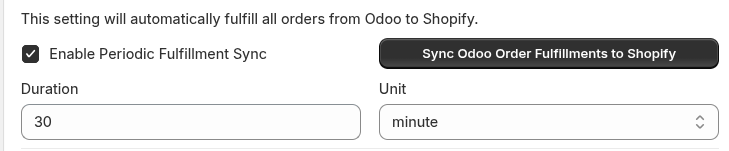
- Navigate to App Settings → Fulfill Orders
- Choose your preferred sync option:
- Cron Job: Set time interval and enable periodic sync
- Manual: Use the sync button for immediate sync
- Ensure all prerequisites are met
- Save your configuration
- Test the sync functionality
Sync Options
Auto Fulfillment Sync
Enable automatic order fulfillment synchronization from Odoo to Shopify:

What it does: Automatically syncs fulfillment status from Odoo to Shopify at specified intervals.
How to configure:
- Toggle "Enable automatic order fulfillment from Odoo Fulfillment to Shopify" to ON
- Set the Duration (e.g., 30 minutes, 1 hour, 1 day)
- The system will automatically sync fulfilled orders at the specified interval
How it works:
- When an order is fulfilled in Odoo, the system checks at the specified interval
- Fulfillment status is automatically updated in Shopify
- Works continuously in the background based on your duration setting
Example:
- Order requests 5 items
- In Odoo, only 2 items are fulfilled
- Auto sync will update and mark 2 items as fulfilled in Shopify
- The remaining 3 items will remain unfulfilled until fulfilled in Odoo
Manual Fulfillment Sync
Manually trigger immediate fulfillment synchronization:

What it does: Allows you to manually trigger a one-time sync of all fulfilled orders from Odoo to Shopify.
How to use:
- Click the "Fulfilled Order Sync" button
- All fulfilled orders in Odoo will sync to Shopify immediately
- No need to enable auto sync for this option
When to use:
- When you want to sync all orders at once
- For immediate synchronization without waiting for auto sync
- For testing or troubleshooting purposes
- When you need to catch up on fulfillment status updates
How Fulfillment Sync Works
From Odoo to Shopify
- Order is fulfilled in Odoo (partially or completely)
- System detects the fulfillment status change
- Fulfillment information is sent to Shopify
- Shopify order status is updated accordingly
Partial Fulfillment
- If only some items are fulfilled in Odoo, only those items will be marked as fulfilled in Shopify
- Remaining items will stay unfulfilled until they are fulfilled in Odoo
- This ensures accurate inventory and fulfillment tracking
Support
If you need help with fulfill orders settings:
- Email: support@techspawn.com
- Documentation: Check our help center for detailed guides