Synco Logs
Synco Logs provides comprehensive tracking of all synchronization activities across your stores. It displays detailed information about product, customer, order, inventory, and fulfillment sync queues with their respective states, allowing you to monitor and track your syncing status.
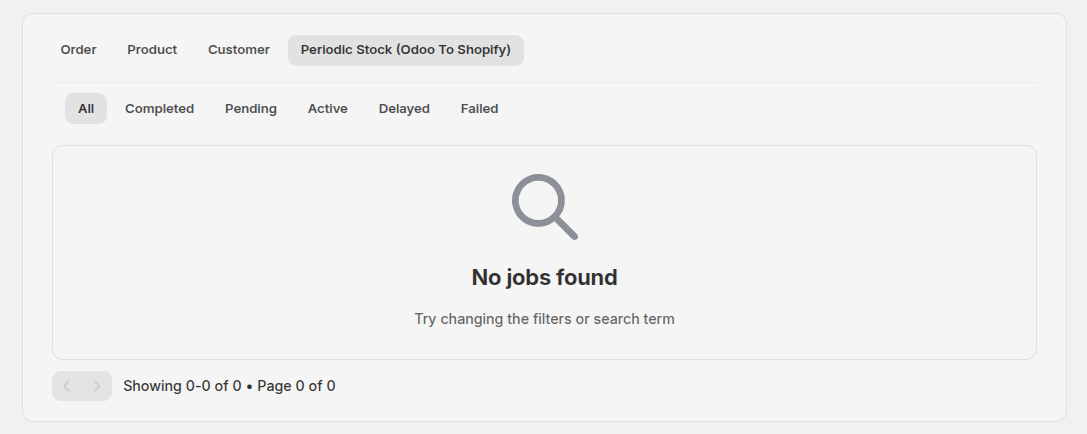
Overview
Synco Logs is a powerful monitoring and tracking system that provides real-time visibility into all synchronization activities across your Shopify stores. It offers detailed insights into sync operations, performance metrics, error tracking, and comprehensive filtering capabilities to help you manage and troubleshoot your synchronization processes effectively.
What's Tracked
Sync Queues
The logs system tracks multiple types of synchronization queues:
Order Sync
- Order Create Queue: Tracks new order creation synchronization
- Order Update Sync Queue: Monitors order update synchronization activities
Product Sync
- Product Create Sync Queue: Tracks new product creation synchronization
- Product Update Sync Queue: Monitors product update synchronization
- Product Sync Queue: General product synchronization activities
- Variant-Level Tracking: Individual product variants are tracked separately for detailed visibility
Customer Sync
- Customer Create Queue: Tracks customer creation from webhooks
- Customer Manual Create Queue: Monitors manually triggered customer synchronization
Inventory Sync
- Stock Sync OTS (On-The-Spot): Real-time stock synchronization activities
- Inventory Flow Direction: Tracks sync direction (Shopify to Odoo or Odoo to Shopify)
Fulfillment Sync
- Odoo Fulfillment Sync: Monitors fulfillment synchronization between Shopify and Odoo
Store Logs
- All sync activities are tracked per store
- Individual store performance monitoring
- Store-specific sync status and issues
- Isolated log management per store
Log Information
Process Details
Each log entry displays comprehensive information:
- Order ID / Product Name / Customer Name: Identifier based on sync type
- Status: Current state of the sync operation with visual badges
- Started At: Timestamp when the sync process began (processedOn)
- Finished At: Timestamp when the sync process completed (finishedOn)
- Time Taken: Calculated duration from start to finish (formatted as hours, minutes, seconds)
- Failed Reason: Detailed error message if sync failed
- Inventory Flow: Direction of sync (Shopify to Odoo / Odoo to Shopify) - shown for inventory tab only
- Operation Type: For customer syncs, shows Create, Update, or Sync operation type
Status States
The system tracks five distinct status states:

- Completed: Sync completed successfully (displayed with green success badge)
- Failed: Sync encountered an error during processing
- Pending (Waiting): Sync is queued and waiting to start
- Active: Sync is currently running
- Delayed: Sync is scheduled but delayed
Features
Tabbed Interface
Navigate between different sync types using tabs:
- Order: View all order-related sync activities
- Product: View product syncs with variant-level detail
- Customer: Monitor customer synchronization activities
- Inventory: Track stock synchronization with flow direction
- Fulfillment: View fulfillment sync operations
Advanced Filtering
Status Filters
- Filter by one or multiple statuses: Completed, Failed, Pending, Active, Delayed
- Quick filter tabs for common views (All, Completed, Failed, Pending, Active, Delayed)
- Create custom filter views and save them for quick access
Search Capabilities
- Search by Name: Filter logs by order ID, product name, or customer name
- Global Query Search: Search across all job fields including name and status
- Real-time filtering as you type
Sorting Options
Sort your logs by:
- Name: Alphabetically (A-Z or Z-A)
- Date: Chronologically (Oldest first or Newest first)
- Status: Alphabetically by status (A-Z or Z-A)
Pagination
- Navigate through large log datasets efficiently
- View 50 entries per page
- See total count and current page information
- Quick navigation with Previous/Next buttons
Clear Logs
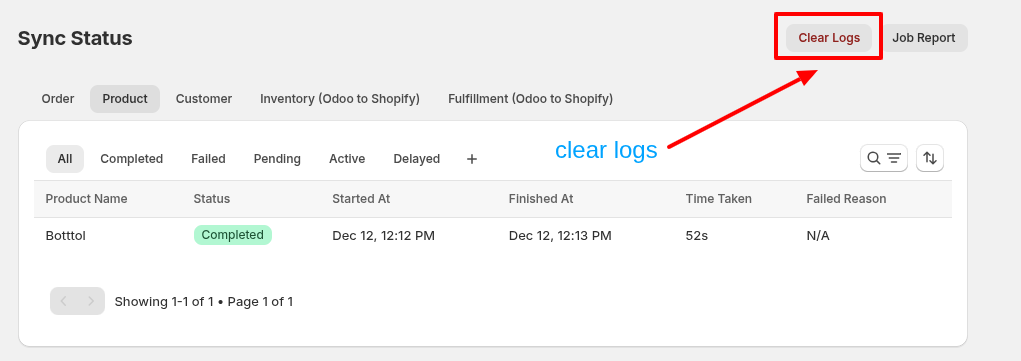
- Remove completed and failed logs to keep your dashboard clean
- Confirmation dialog prevents accidental deletion
- Only removes logs for your specific store
- Preserves active, pending, and delayed jobs
Dashboard Reports
Set up automated email reports for your sync logs:
Email Verification
- Verify your email address before receiving reports
- Click "Send Verification" to receive a verification link
- Verification link expires in 24 hours
- Reports only sent to verified email addresses
Report Frequency
Configure how often you receive reports:
- Daily: Receive reports every 24 hours
- 2 Days: Receive reports every 2 days
- Week: Receive reports every 7 days
- 15 Days: Receive reports every 15 days
- Month: Receive reports every 30 days
Report Features
- Automatic scheduling based on your selected frequency
- Only one report job per shop (prevents duplicates)
- Reports include comprehensive sync activity summary
- Access dashboard via secure token-based link
How to Access Logs
- Navigate to Synco Logs section in your Shopify app dashboard
- Select the appropriate tab (Order, Product, Customer, Inventory, or Fulfillment)
- Use filters and search to find specific sync activities
- Sort and paginate through results as needed
- Click on individual log entries to view detailed information
Using Filters and Views
Quick Filter Tabs
- Click on filter tabs (All, Completed, Failed, etc.) to quickly filter by status
- The "All" tab shows all logs regardless of status
Advanced Filters
- Click the filter icon in the search bar
- Select one or more status filters
- Enter a name in the "Search by Name" field
- Apply filters to see filtered results
- Remove individual filters or clear all filters
Custom Views
- Create custom filter views for frequently used filter combinations
- Save views with custom names
- Duplicate, rename, or delete custom views
- Quick access to saved views from the filter tabs
Benefits
- Real-time Monitoring: Track sync status in real-time with live updates
- Performance Analysis: Monitor sync duration and identify slow operations
- Error Tracking: Quickly identify and resolve sync issues with detailed error messages
- Store Management: Monitor individual store sync activities separately
- Historical Data: Access past sync logs for analysis and auditing
- Variant-Level Visibility: See individual product variant sync status
- Automated Reporting: Receive regular email summaries of sync activities
- Efficient Navigation: Powerful filtering and sorting for large datasets
- Clean Interface: Remove old logs to maintain a clean dashboard
Best Practices
- Regular Monitoring: Check logs regularly to catch issues early
- Filter Failed Jobs: Use the Failed filter to quickly identify and resolve errors
- Clear Old Logs: Periodically clear completed and failed logs to improve performance
- Set Up Reports: Configure email reports for automated monitoring
- Use Custom Views: Create saved views for common filter combinations
- Check Inventory Flow: Monitor inventory sync direction to ensure correct data flow
- Review Time Taken: Identify slow sync operations that may need optimization
Support
If you need help with logs:
- Email: support@techspawn.com
- Documentation: Check our help center for detailed guides
- Error Messages: Review failed reason details in the logs for troubleshooting
Subscription
Learn how to purchase, manage, and cancel Synco subscription plans.
Auto Order Sync
Auto Order Sync automatically synchronizes orders from your Shopify store to Odoo ERP system. When any order is placed in Shopify, it will be automatically synced to Odoo based on your app settings and order rules.