Auto Order Sync
Auto Order Sync automatically synchronizes orders from your Shopify store to Odoo ERP system. When any order is placed in Shopify, it will be automatically synced to Odoo based on your app settings and order rules.
How It Works
When a customer places an order in Shopify:
- The order is automatically detected
- The system checks your configured order rules
- The order is synced to Odoo based on your app settings
- The sync happens without any manual intervention

Enabling Auto Order Sync
To enable automatic order synchronization:
- Navigate to Settings in your Synco app
- Go to the Order Settings tab
- Toggle the Order Settings switch to enable auto sync
- Configure your order rules and preferences
- Save your settings
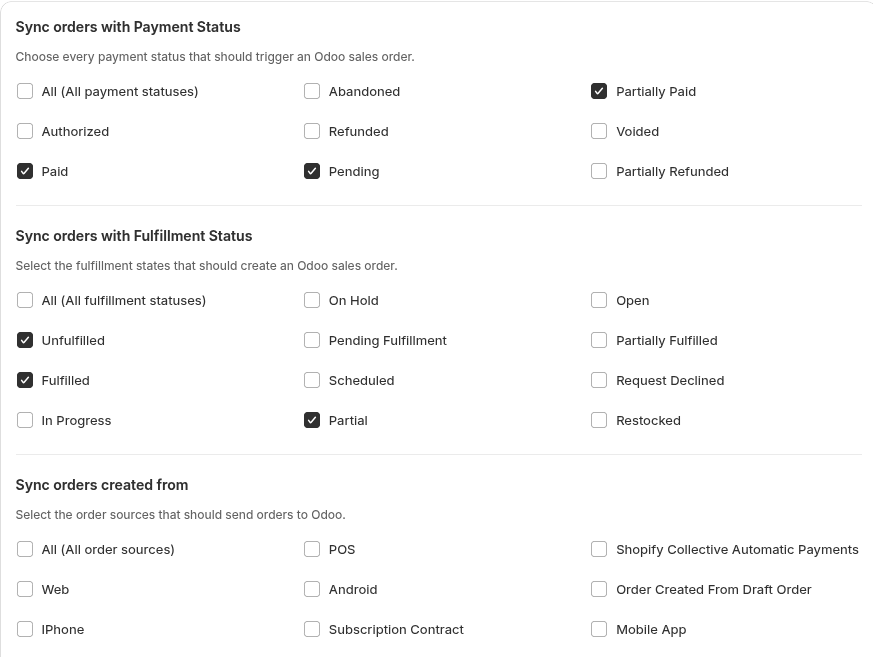
Order Rules
Your order sync behavior is controlled by the order rules you configure in your app settings. These rules determine:
- Which orders get synced based on payment status
- Which orders get synced based on fulfillment status
- Which orders get synced based on order source (including custom sources)
- How orders are created in Odoo (draft orders, confirmed orders, or invoices)
- Additional Shopify fields to include (note attributes, order tags)
- Date range for order synchronization
- Order prefix customization
- Shopify order number synchronization
- Refund order synchronization with stock restoration
For detailed information about configuring order rules, see Order Rules.
Key Features
Payment and Fulfillment Status Filtering
- Select specific payment statuses (Paid, Pending, Partially Paid, etc.)
- Select specific fulfillment statuses (Unfulfilled, Fulfilled, Partial, etc.)
- Use "All" option to select all statuses at once
Order Source Filtering
- Filter by order source (Web, POS, Mobile App, etc.)
- Add custom order sources as needed
- Use "All" option to sync from all sources
Order Creation Options
You have flexible options for creating orders in Odoo:
Sale Order Options:
- Create as Draft Sale Order (only)
- Create as Confirmed Sale Order (only)
Invoice Options (Can be selected independently):
- Create as Draft Sale Invoice only (invoice only, no sale order)
- Create as Confirmed Sale Invoice only (invoice only, no sale order)
Combined Options:
- Combine Sale Order with Draft Sale Invoice
- Combine Sale Order with Confirmed Sale Invoice
If you want invoice only, you can select invoice only. If you want draft invoice only, select draft invoice only. You don't need to combine them with sale order unless you want both.
Additional Options
- Start Syncing Orders From: Limit sync to orders from a specific date onwards
- Order Prefix: Add custom prefix to Odoo order numbers (e.g., "SyncoOrders0001")
- Shopify Order Number Sync: Use Shopify order numbers in Odoo
- Refund Order Sync: Automatically sync refunds and restore stock in Odoo
App Settings
Configure your auto order sync preferences in the app settings to control:
- Sync conditions (payment, fulfillment, source)
- Order processing rules (how orders are created in Odoo)
- Data mapping preferences (fields to include)
- Date range limitations
- Order numbering preferences
- Refund handling
Support
If you need help with auto order sync:
- Email: support@techspawn.com
- Documentation: Check our help center for detailed guides
Synco Logs
Synco Logs provides comprehensive tracking of all synchronization activities across your stores. It displays detailed information about product, customer, order, inventory, and fulfillment sync queues with their respective states, allowing you to monitor and track your syncing status.
Manual Order Sync
Manual order sync lets you push Shopify orders into Odoo ERP on-demand when auto sync is unavailable.