Order
Manual Order Sync
Manual order sync lets you push Shopify orders into Odoo ERP on-demand when auto sync is unavailable.
Manual Order Sync
Manual order sync allows you to synchronize orders from your Shopify store to Odoo ERP system on-demand. This feature is useful when you need to sync specific orders or when automatic sync is not available.
Prerequisites
Before you can perform manual order sync, ensure you have completed the following requirements:
1. Product Synchronization
- All products must be synced from Shopify to Odoo
- Product variants and attributes should be properly mapped
- Inventory levels should be updated in Odoo
2. Customer Synchronization
- All customers must be synced from Shopify to Odoo
- Customer data including addresses and contact information should be complete
- Customer groups and tags should be properly mapped
3. Odoo Server Configuration
- Odoo server must be properly configured and accessible
- API credentials should be set up correctly
- Required modules (Sales, Inventory, CRM) should be installed and activated
How to Perform Manual Order Sync
Step 1: Navigate to Order Sync
- Navigate to your Synco dashboard
- Navigate to the Orders section from the main menu
- Click on Sync button
Step 2: Select Orders to Sync
- You'll see a list of orders that can be synced
- Filter orders by status: All, Synced, Not Synced, Eligible, Sale Order, or Invoice
- When an order is synced, it will have an Odoo ID - clicking on it will navigate to Odoo
Step 3: Execute Sync and Monitor Status
- Review your selected orders and settings
- Click Sync button next to the order you want to sync
- The sync status will immediately appear showing:
- In Progress: Sync is currently processing (spinning loader icon)
- Synced: Sync completed successfully (green indicator with Odoo ID)
- Not Synced: Order hasn't been synced yet (shows "Sync" button)
- Once synced, the status changes from "Not Synced" to "Synced" and displays the Odoo ID
Sync Process Details
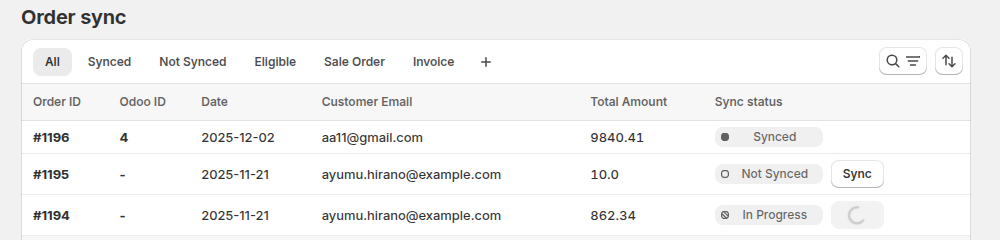
Sync Status Indicators
- Synced: Order successfully synced to Odoo (shows Odoo ID)
- Not Synced: Order hasn't been synced yet (shows "Sync" button)
- In Progress: Sync is currently processing (shows loading indicator)
What Gets Synced
- Order Information: Order number, date, status, and totals
- Customer Details: Customer information and shipping/billing addresses
- Product Line Items: Products, quantities, prices, and discounts
- Payment Information: Payment method and transaction details
- Shipping Information: Shipping method, tracking, and delivery details
- Tax Information: Tax calculations and tax line items
- Order Attributes: Note attributes and order tags (if enabled in settings)
- Order Prefix: Custom order prefix will be applied (if configured)
How Orders Are Created in Odoo
Manual sync respects your order rules configuration:
- Orders will be created according to your "Create Synced Orders in Odoo As" setting
- If configured, invoices will be created based on your invoice options
- Order prefix will be applied if configured
- Shopify order number will be used if "Shopify Order Number Sync" is enabled
Sync Logs and Reports
Viewing Sync Logs
- Navigate to Sync Logs section
- Filter by date range, order number, or sync status
- Click on individual log entries for detailed information
Support and Help
If you encounter issues with manual order sync:
- Email: support@techspawn.com
- Documentation: Check our help center for detailed guides
Note: Manual order sync is a powerful feature that requires proper setup. Ensure all prerequisites are met before attempting to sync orders to avoid data inconsistencies.