Stock Sync Odoo to Shopify
Sync Odoo stock to Shopify automatically with scheduled sync or manually on-demand.
Important: Stock sync will ONLY work for products that are already linked/mapped between Odoo and Shopify and configured with proper location mapping settings. Products that are not linked to Shopify or lack location mapping will be skipped during the sync process.
The Stock Sync feature allows you to automatically synchronize inventory levels from your Odoo system to Shopify, ensuring your online store always displays accurate stock quantities.
How It Works
Stock synchronization runs as a background process that transfers stock data from Odoo to Shopify based on your configured location mappings. This ensures your Shopify storefront reflects the most current inventory levels from your Odoo system.
Configuration Options
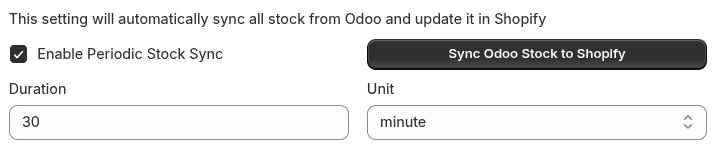
Automatic Periodic Sync
To enable automatic stock synchronization:
- Enable Periodic Stock Sync: Check the "Enable periodic stock sync" option
- Set Duration: Specify how often you want the sync to run
- Select Time Unit: Choose from the dropdown menu:
- Minutes: For frequent updates (e.g., every 15 minutes)
- Hours: For regular updates (e.g., every 2 hours)
- Days: For daily or weekly updates (e.g., every 1 day)
Once configured, the system will automatically sync stock levels in the background according to your specified schedule.
Manual Sync
For immediate stock synchronization:
- Disable Automatic Sync: Uncheck the "Enable periodic stock sync" option
- Manual Trigger: Click the "Sync Odoo Stock to Shopify" button
- Processing Time: The sync process will begin immediately and may take some time depending on the number of products in your inventory
Important Notes
Product Mapping Requirements
- Mapped Products Only: Stock synchronization only applies to products that are already mapped between Odoo and Shopify
- Location Mapping: Sync is based on the location mappings you have configured in your system
- Product Status: Check the Product Status page to verify which Odoo variants are mapped to which Shopify products
Performance Considerations
- Processing Time: The sync duration depends on your total product count and system performance
- Background Processing: Automatic sync runs in the background without interrupting your workflow
- Real-time Updates: Manual sync provides immediate updates when you need them
Best Practices
- Regular Monitoring: Check the Product Status page regularly to ensure proper product mapping
- Appropriate Frequency: Set sync frequency based on your business needs - more frequent for high-volume stores, less frequent for smaller inventories
- Location Mapping: Ensure your location mappings are correctly configured before enabling automatic sync
- Manual Sync: Use manual sync for immediate updates when you need to reflect stock changes right away
This feature ensures your customers always see accurate product availability, reducing the risk of overselling and improving customer satisfaction.